
Client-Side Rendering
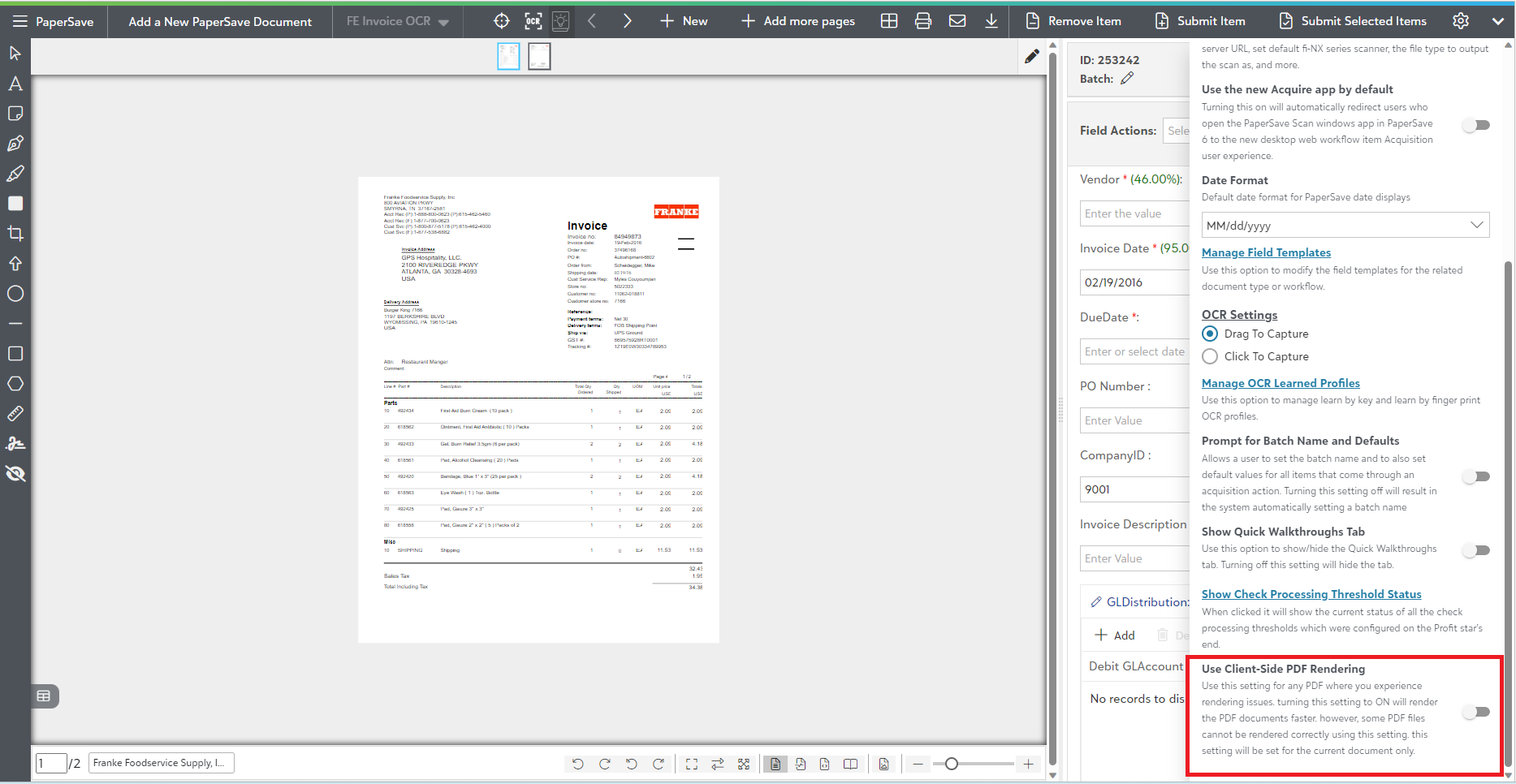
PaperSave now provides the “Use Client-Side PDF Rendering” option within the item viewer’s settings panel which on enabling helps to load the PDF document faster than the Server-side rendering.
Note: The “Use Client-Side PDF Rendering” option is only supported for PDF MIME-type documents. Hence, this settings option appears only when you acquire/open the PDF document in an item viewer.
This option remains enabled if the PDF document size is under the defined threshold limit and automatically gets disabled when the document size crosses the threshold. However, once you change this settings option (i.e., enable/disable the option) for the particular acquired/opened PDF document, your changes automatically get remembered for it, irrespective to the size of that document.
To change the rendering size limit, you can contact your PaperSave’s System Admin user and update the config value of “MaxDocSizeForPDFClientSideRenderingInMB” configuration from the Miscellaneous Settings in the Configuration Area.
When the Client-side rendering option is enabled:
1) The document starts rendering at the client’s side.
2) Although the document renders quicker than the Server-side rendering, there is a possibility of distortion.
3) The “image/SVG rendering” option disappears from the Content display option.

The following are the primary benefits of this option:
- You can easily set the rendering on the Client or Server-side because this settings option is user-specific.
- Certain distorted PDF documents will now display properly.
- The text search within the document becomes easy to search.